Data Visualization

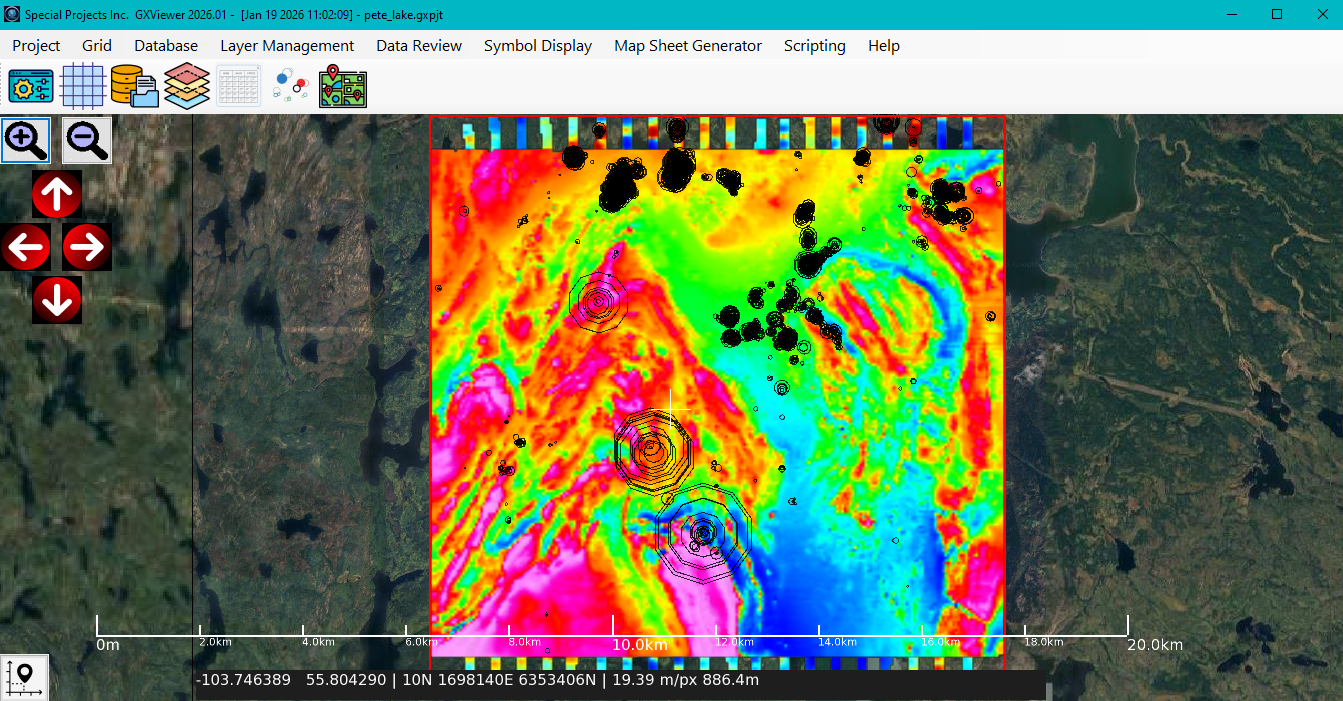
An application for viewing, editing, gridding, and map generation of airborne survey data including magnetic and radiometric measurements using our own data that we collect.

Learn More
5,000
Max Flight Lines
100+
Data Columns
40+
Built-in Functions
7+
Color Palettes
Features

What You Can Do

Database Management

Import, create, and manage survey databases with support for CSV, XYZ, and KML formats. Custom import templates for repeatable workflows.

Grid Display

Create interpolated grids using the minimum curvature algorithm. Visualize data with customizable colormaps and real-time preview.

Symbol Display

Visualize data as proportional or color-range vector symbols on interactive maps. Essential for accurately locating anomalies on a map.

Expression Editor

Process data using mathematical expressions with built-in functions. Create complex calculations for data transformation.

Profile Visualization

View flight line data as interactive profiles with cursor synchronization. Edit data directly in profile view.

AI Scripting

Automate workflows with the AI-based scripting console. Full API access for batch processing and custom analysis pipelines.

Capabilities

Multi-Layer Management

Control visibility and display settings for grids, symbols, line paths, and background maps.

Data Editing

Multi-cell operations, line splitting, deletion, and renaming with undo/redo support.

Google Maps Integration

Interactive web map background for geographic context and reference.

Multiple Export Formats

Export to PNG, GeoTIFF, and GXF formats for sharing and further analysis.

Project-Based Workflow

Save complete project state including all layers, settings, and configurations.

Map Sheet Generator

Create publication-quality map outputs with customizable templates.

Synchronized Cursor

Real-time profile visualization with synchronized map cursor for geographic correlation.

Batch Processing

Automate repetitive tasks with AI scripting and saved import templates.

Custom Solutions

Powerful Scripting Tools

GXViewer includes a powerful AI-based scripting engine that allows you to automate workflows, create custom processing pipelines, and extend the application's capabilities.

Need a custom script for your specific workflow? Our team can develop tailored solutions to meet your unique geophysical data processing requirements.

  • Custom data processing scripts
  • Automated batch workflows
  • Integration with external tools

Request Custom Scripting

We respect your privacy and will only use your information to respond to your inquiry.

File Formats

Data Import & Export

Input Formats

CSV XYZ TXT DAT KML

Output Formats

PNG GeoTIFF GXF

GXViewer Native Formats

.gdc Survey Database

.gxpjt Project File

.gxit Import Template

.expr Expression File

.gxtpl MapSheet Template

.gxscr AI Script

.tbl Colormap File

Ready to Visualize Your Survey Data?

Download GXViewer today and start using to view your collected Survey Data.

+1 (403) 457-5032

79.38 MB | Released Feb 20, 2026